> ## Documentation Index
> Fetch the complete documentation index at: https://ikun.mintlify.site/llms.txt
> Use this file to discover all available pages before exploring further.
# 简介
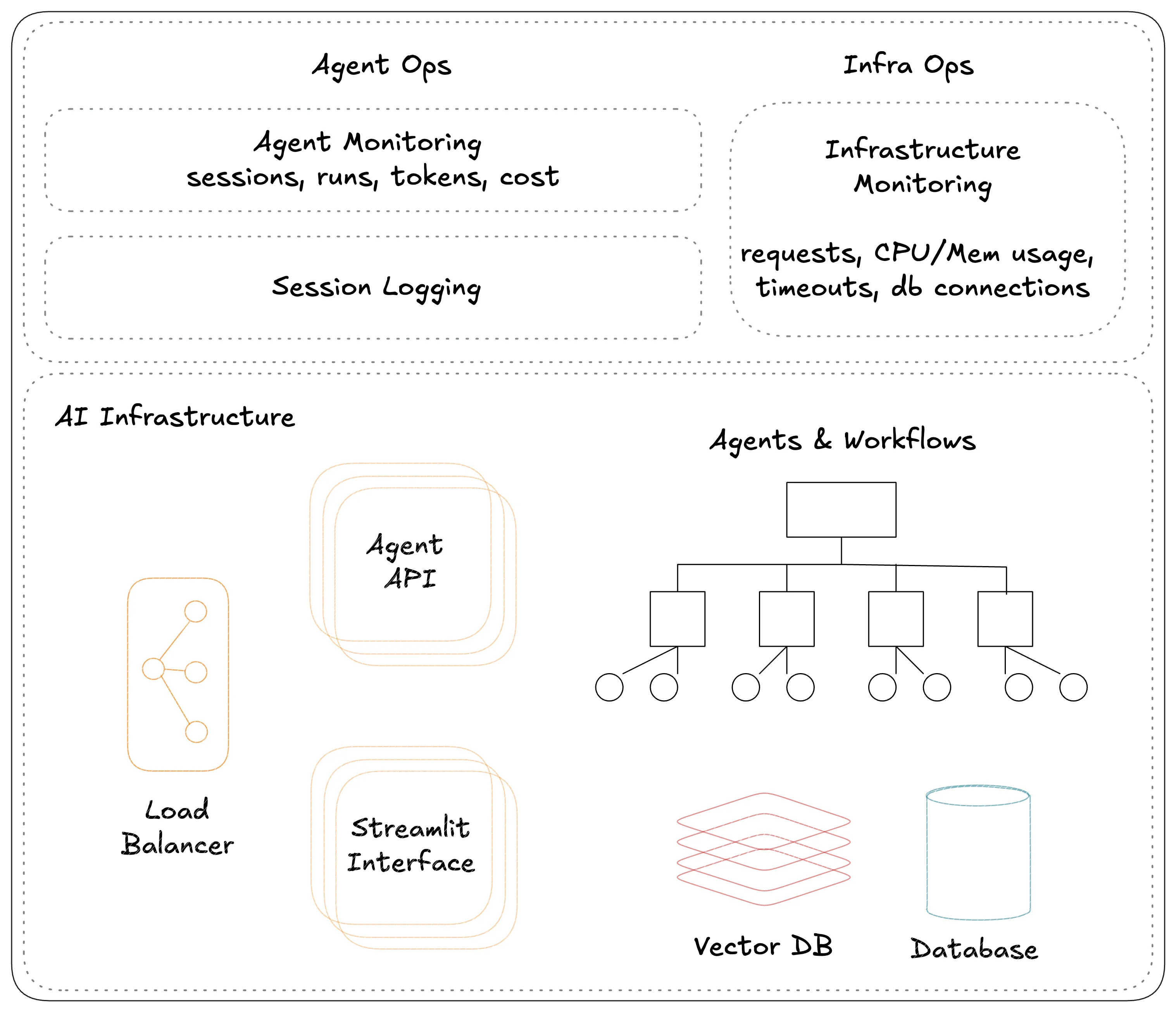
**Agno Workspaces** 是用于通过 Docker 在本地运行 Agentic Systems 和在 AWS 上进行生产的标准代码库。它们帮助我们像管理代码一样来管理我们的 Agentic System。
 ## 创建新的工作区
运行 `ag ws create` 来创建一个新的工作区,该命令会询问你关于起始模板和工作区名称。
```bash Create Workspace theme={null}
ag ws create
```
```bash Create Agent App theme={null}
ag ws create -t agent-app-aws -n agent-app
```
```bash Create Agent API theme={null}
ag ws create -t agent-api-aws -n agent-api
```
## 启动工作区资源
运行 `ag ws up` 来启动,即创建工作区资源。
```bash terminal theme={null}
ag ws up
```
```bash shorthand theme={null}
ag ws up dev:docker
```
```bash full options theme={null}
ag ws up --env dev --infra docker
```
```bash short options theme={null}
ag ws up -e dev -i docker
```
## 停止工作区资源
运行 `ag ws down` 来停止,即删除工作区资源。
```bash terminal theme={null}
ag ws down
```
```bash shorthand theme={null}
ag ws down dev:docker
```
```bash full options theme={null}
ag ws down --env dev --infra docker
```
```bash short options theme={null}
ag ws down -e dev -i docker
```
## 补丁工作区资源
运行 `ag ws patch` 来打补丁,即更新工作区资源。
```bash terminal theme={null}
ag ws patch
```
```bash shorthand theme={null}
ag ws patch dev:docker
```
```bash full options theme={null}
ag ws patch --env dev --infra docker
```
```bash short options theme={null}
ag ws patch -e dev -i docker
```
## 创建新的工作区
运行 `ag ws create` 来创建一个新的工作区,该命令会询问你关于起始模板和工作区名称。
```bash Create Workspace theme={null}
ag ws create
```
```bash Create Agent App theme={null}
ag ws create -t agent-app-aws -n agent-app
```
```bash Create Agent API theme={null}
ag ws create -t agent-api-aws -n agent-api
```
## 启动工作区资源
运行 `ag ws up` 来启动,即创建工作区资源。
```bash terminal theme={null}
ag ws up
```
```bash shorthand theme={null}
ag ws up dev:docker
```
```bash full options theme={null}
ag ws up --env dev --infra docker
```
```bash short options theme={null}
ag ws up -e dev -i docker
```
## 停止工作区资源
运行 `ag ws down` 来停止,即删除工作区资源。
```bash terminal theme={null}
ag ws down
```
```bash shorthand theme={null}
ag ws down dev:docker
```
```bash full options theme={null}
ag ws down --env dev --infra docker
```
```bash short options theme={null}
ag ws down -e dev -i docker
```
## 补丁工作区资源
运行 `ag ws patch` 来打补丁,即更新工作区资源。
```bash terminal theme={null}
ag ws patch
```
```bash shorthand theme={null}
ag ws patch dev:docker
```
```bash full options theme={null}
ag ws patch --env dev --infra docker
```
```bash short options theme={null}
ag ws patch -e dev -i docker
```
部分资源的 `patch` 命令正在开发中。如有需要,请使用 `restart` 命令。
## 重启工作区
运行 `ag ws restart` 来停止资源并重新启动它们。
```bash terminal theme={null}
ag ws restart
```
```bash shorthand theme={null}
ag ws restart dev:docker
```
```bash full options theme={null}
ag ws restart --env dev --infra docker
```
```bash short options theme={null}
ag ws restart -e dev -i docker
```
## 设置现有工作区
如果你直接克隆了代码库(例如,如果你的同事创建了它),请运行 `ag ws setup` 在本地进行设置。
```bash terminal theme={null}
ag ws setup
```
```bash with debug logs theme={null}
ag ws setup -d
```
## 命令选项
运行 `ag ws up --help` 查看所有选项
### 环境 (`--env`)
使用 `--env` 或 `-e` 标志来过滤环境(dev/prd)。
```bash flag theme={null}
ag ws up --env dev
```
```bash shorthand theme={null}
ag ws up dev
```
```bash short options theme={null}
ag ws up -e dev
```
### 基础设施 (`--infra`)
使用 `--infra` 或 `-i` 标志来过滤基础设施(docker/aws/k8s)。
```bash flag theme={null}
ag ws up --infra docker
```
```bash shorthand theme={null}
ag ws up :docker
```
```bash short options theme={null}
ag ws up -i docker
```
### 组 (`--group`)
使用 `--group` 或 `-g` 标志来按资源组进行过滤。
```bash flag theme={null}
ag ws up --group app
```
```bash full options theme={null}
ag ws up \
--env dev \
--infra docker \
--group app
```
```bash shorthand theme={null}
ag ws up dev:docker:app
```
```bash short options theme={null}
ag ws up \
-e dev \
-i docker \
-g app
```
### 名称 (`--name`)
使用 `--name` 或 `-n` 标志来按资源名称进行过滤。
```bash flag theme={null}
ag ws up --name app
```
```bash full options theme={null}
ag ws up \
--env dev \
--infra docker \
--name app
```
```bash shorthand theme={null}
ag ws up dev:docker::app
```
```bash short options theme={null}
ag ws up \
-e dev \
-i docker \
-n app
```
### 类型 (`--type`)
使用 `--type` 或 `-t` 标志来按资源类型进行过滤。
```bash flag theme={null}
ag ws up --type container
```
```bash full options theme={null}
ag ws up \
--env dev \
--infra docker \
--type container
```
```bash shorthand theme={null}
ag ws up dev:docker:app::container
```
```bash short options theme={null}
ag ws up \
-e dev \
-i docker \
-t container
```
### 试运行 (`--dry-run`)
可以使用 `--dry-run` 或 `-dr` 标志来**试运行**命令。`ag ws up -dr` 只会打印资源,而不会创建它们。
```bash flag theme={null}
ag ws up --dry-run
```
```bash full options theme={null}
ag ws up \
--env dev \
--infra docker \
--dry-run
```
```bash shorthand theme={null}
ag ws up dev:docker -dr
```
```bash short options theme={null}
ag ws up \
-e dev \
-i docker \
-dr
```
### 显示调试日志 (`--debug`)
使用 `--debug` 或 `-d` 标志来显示调试日志。
```bash flag theme={null}
ag ws up -d
```
```bash full options theme={null}
ag ws up \
--env dev \
--infra docker \
-d
```
```bash shorthand theme={null}
ag ws up dev:docker -d
```
```bash short options theme={null}
ag ws up \
-e dev \
-i docker \
-d
```
### 强制重新创建镜像和容器 (`-f`)
使用 `--force` 或 `-f` 标志来强制重新创建镜像和容器。
```bash flag theme={null}
ag ws up -f
```
```bash full options theme={null}
ag ws up \
--env dev \
--infra docker \
-f
```
```bash shorthand theme={null}
ag ws up dev:docker -f
```
```bash short options theme={null}
ag ws up \
-e dev \
-i docker \
-f
```