> ## Documentation Index
> Fetch the complete documentation index at: https://ikun.mintlify.site/llms.txt
> Use this file to discover all available pages before exploring further.
# 在 Agno 平台进行评估
> 您可以在 Agno 平台上跟踪您的评估运行情况
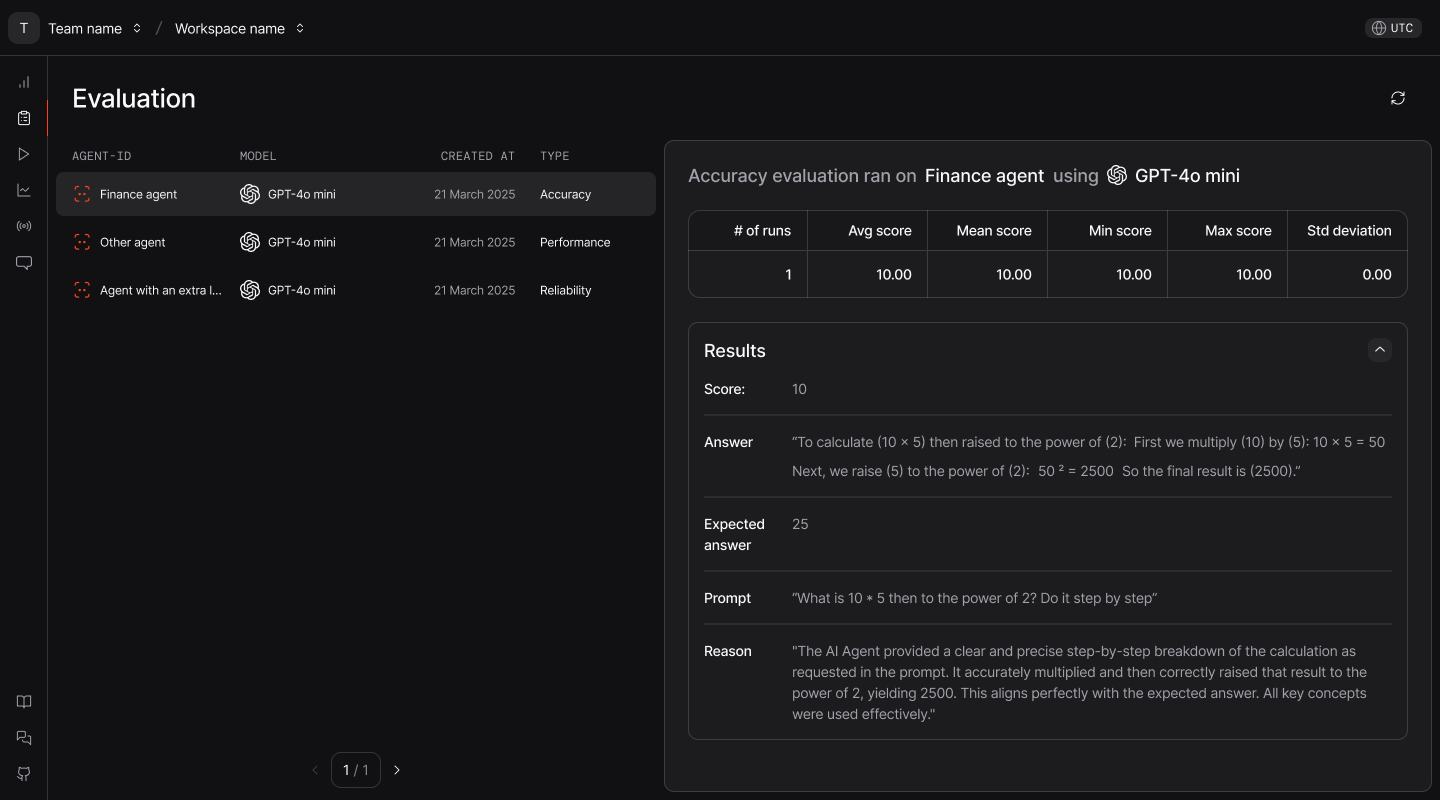 ## 跟踪您的评估
除了在 CLI 上运行评估外,您还可以在 Agno 平台上跟踪您的评估。这有助于跟踪结果并与团队共享。
请按照以下步骤进行操作:
您可以使用 CLI 或 API 密钥进行身份验证。
**使用您的 CLI:**
```bash theme={null}
ag setup
```
**使用您的 API 密钥:**
从 [Agno App](https://app.agno.com/settings) 获取您的 API 密钥,并使用它将您本地运行的代理连接到 Agno 平台。
```bash theme={null}
export AGNO_API_KEY=your_api_key_here
```
在运行评估时,将 `monitoring` 设置为 `True` 即可在 Agno 平台上跟踪所有运行情况:
```python theme={null}
from agno.agent import Agent
from agno.eval.accuracy import AccuracyEval
from agno.models.openai import OpenAIChat
evaluation = AccuracyEval(
model=OpenAIChat(id="gpt-4o"),
agent=Agent(model=OpenAIChat(id="gpt-4o")),
input="What is 10*5 then to the power of 2? do it step by step",
expected_output="2500",
monitoring=True, # This activates monitoring
)
# This run will be tracked on the Agno platform
result = evaluation.run(print_results=True)
```
您还可以将 `AGNO_MONITOR` 环境变量设置为 `true` 来跟踪所有评估运行。
您现在可以在 Agno 平台上的 [app.agno.com/evaluations](https://app.agno.com/evaluations) 查看您的评估结果。
遇到问题?请查看我们的 [故障排除指南](/faq/cli-auth)
## 跟踪您的评估
除了在 CLI 上运行评估外,您还可以在 Agno 平台上跟踪您的评估。这有助于跟踪结果并与团队共享。
请按照以下步骤进行操作:
您可以使用 CLI 或 API 密钥进行身份验证。
**使用您的 CLI:**
```bash theme={null}
ag setup
```
**使用您的 API 密钥:**
从 [Agno App](https://app.agno.com/settings) 获取您的 API 密钥,并使用它将您本地运行的代理连接到 Agno 平台。
```bash theme={null}
export AGNO_API_KEY=your_api_key_here
```
在运行评估时,将 `monitoring` 设置为 `True` 即可在 Agno 平台上跟踪所有运行情况:
```python theme={null}
from agno.agent import Agent
from agno.eval.accuracy import AccuracyEval
from agno.models.openai import OpenAIChat
evaluation = AccuracyEval(
model=OpenAIChat(id="gpt-4o"),
agent=Agent(model=OpenAIChat(id="gpt-4o")),
input="What is 10*5 then to the power of 2? do it step by step",
expected_output="2500",
monitoring=True, # This activates monitoring
)
# This run will be tracked on the Agno platform
result = evaluation.run(print_results=True)
```
您还可以将 `AGNO_MONITOR` 环境变量设置为 `true` 来跟踪所有评估运行。
您现在可以在 Agno 平台上的 [app.agno.com/evaluations](https://app.agno.com/evaluations) 查看您的评估结果。
遇到问题?请查看我们的 [故障排除指南](/faq/cli-auth)